Extensible Compilation
How Laylight compiles source code into an intermediate representation, and how back ends turn it into GDSII, OASIS, netlists and 3D models.
Laylight is a compiler. Source code goes through a front end that parses it and checks names, types and units, and an evaluator that runs the cells, resolves placements, computes boolean and morphological operations and instantiates every parameter combination as a cell of its own. What comes out is the Laylight IR, and everything after that is a back end.
| Stage | Input | Output |
|---|---|---|
| Front end | .lyl source files and their imports | syntax tree, resolved names, type and unit diagnostics |
| Evaluator | the checked program and a top cell | the Laylight IR |
| Back ends | the Laylight IR | GDSII, OASIS (in development), netlist JSON, IR text, 3D models, simulation inputs, … |
The Laylight IR
The IR is the evaluated layout, complete and independent of the source that produced it:
- the database unit and the layer table (names and GDS layer / datatype numbers);
- cells, each with its source cell name and the final values of its parameters and attributes;
- shapes as boxes, polygons and paths in integer database units;
- instances with their transforms (translation, any rotation, mirroring), and regular arrays;
- markers: named, located frames with attributes, such as ports and light sources;
- connections between ports, declared by port-to-port placement or found geometrically.
It has a stable text form, printed by laylight ir and read back by import "cells.lyir", which the test suite uses for snapshots and which is easy to read and to parse:
laylight-ir 1
dbu 1nm
layer si 1/0
layer slab 2/0
layer marker 255/0
cell RingResonator source=RingResonator {
  param radius 10um
  param width 500nm
  param gap 200nm
  param bus_length 30um
  box si 0 -250 30000 250
  polygon si (25250,10700) (25246,10986) (25234,11272) ...
  marker input (0,0,0deg) {type="waveguide", direction="input", width=500nm}
  marker output (30000,0,0deg) {type="waveguide", direction="output", width=500nm}
  marker source (1000,0,0deg) {kind="light_source"}
}
top RingResonator
Because the IR carries everything the layout means, not only its polygons, a back end needs nothing else: not the source, not the language, not the evaluator. New targets are added next to the existing ones without touching the language.
The same holds in the other direction: anything that writes IR can use the back ends. The Python library is such a front end. Its devices build IR in Python, with the same cells per parameter set, port markers and connections, and layout.write("out.gds") hands it to laylight build.
Reusing an existing GDS library
import "cells.gds" reads an existing GDS library into IR and exposes its cells to source code. A selected cell can have a local DSL alias; evaluation copies it and its children into the design, preserving layers and hierarchy while converting coordinates to the design's DBU. The GDS does not need to be decompiled into source before it can be placed. Imported geometry is fixed, with Laylight attributes and markers restored when the file carries their metadata.
Back ends
GDSII. laylight build ring.lyl -o ring.gds writes the IR as GDSII. Cells keep their hierarchy, regular grids of instances become array references, and polygons beyond the GDS vertex limit are split. Markers and cell parameters are written as properties of text elements on a marker layer, so they survive the trip: laylight decompile turns a GDS file back into Laylight source, restores the markers and records each cell's source and parameters, and a GDS → Laylight → GDS round trip is geometrically identical.
Blackboxes. laylight blackbox turns cells into blackboxes: their outline and ports, without their geometry, as IR text that other projects import and place like any cell. laylight unbox puts the real cells back into a design, from source, IR or GDS, matching each blackbox by its signature.
OASIS. An OASIS writer, for smaller files on large layouts, is in development.
Netlists. laylight netlist exports the ports, instances and connections of every cell as JSON, and laylight lvs compares a design with a reference netlist in the same format. Both also read IR and GDSII and connect the ports that meet, so they check layouts from other front ends too.
The browser. The compiler is also built for WebAssembly. The DSL playground and the Tour compile Laylight code to GDS in the browser and draw it with the Laylight viewer; the previews on these pages draw the IR directly.
Example: from layout to a 3D model with PSVFab
PSVFab is PhotonStack's process-aware structure emulator. Given a layout and a process description, a sequence of depositions, etches, polishing and implant steps, it builds the fabricated structure with the OpenCascade kernel and exports 3D models (STEP, STL, GLB) of the final device or of any intermediate step, vector cross sections and fabrication animations. Compiling Laylight code with PSVFab as the back end turns a device description into a 3D model.
The device is an all-pass ring resonator on SOI rib waveguides, with a heater on top. Three layers describe it: the waveguide core, the partially etched slab (the core grown by 2 µm) and the heater metal.
import "tech.lyl"

cell HeatedRing {
    param {
        radius size = 10um
        width  size = 500nm
        gap    size = 200nm
    }

    layer si {
        shape rect with 2 * radius + 16um, width as bus
        shape ring with radius, width as resonator
        place bus.center at self.origin
        place resonator.center at bus.center offset (0, width + gap + radius)
    }

    # The partially etched slab: the waveguides grown by 2 um.
    layer slab {
        shape (bus + resonator) + 2um as rib
    }

    # A heater over the ring, open at the top, with two contact pads.
    layer metal {
        shape ring with radius, 2um, angle = 300deg, start_angle = 120deg as heater
        shape rect with 6um, 6um as left_pad
        shape rect with 6um, 6um as right_pad
        place heater at resonator.center
        place left_pad.center at resonator.center + (radius * cos(120deg), radius * sin(120deg) + 2um)
        place right_pad.center at resonator.center + (radius * cos(60deg), radius * sin(60deg) + 2um)
    }
}
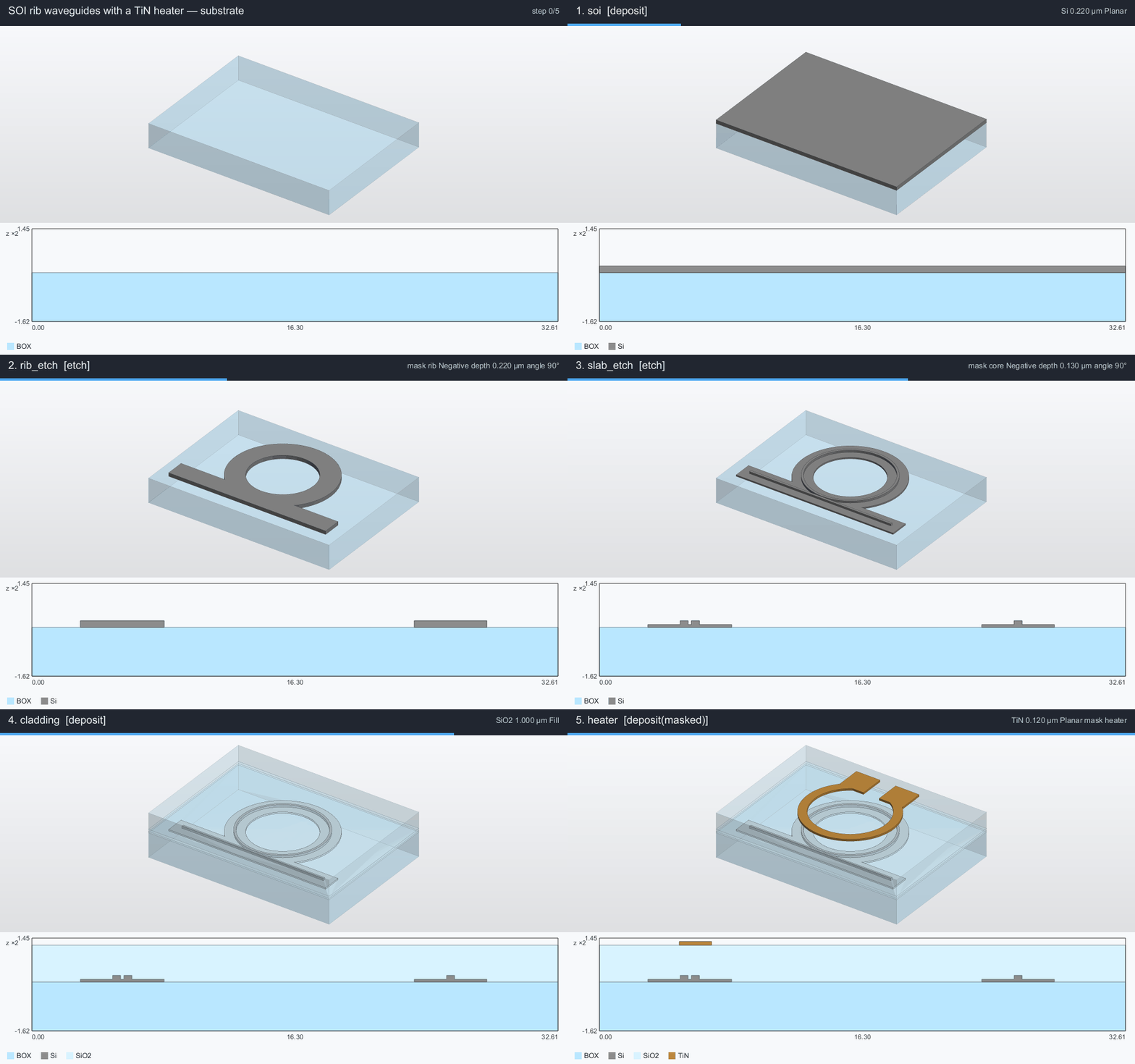
The process file names the masks by their GDS layers, the same numbers as the Laylight layer table (si 1/0, slab 2/0, metal 10/0), and lists the steps: a 220 nm silicon film on buried oxide, a full etch outside the rib, a 130 nm etch outside the core that leaves a 90 nm slab, an oxide cladding, and a TiN heater.
name: SOI rib waveguides with a TiN heater
units: um

chip:
  margin: 3
  substrate: { material: BOX, thickness: 2 }

materials:
  BOX: { color: "#b9e7ff", opacity: 0.35 }
  Si: "#8c8c8c"
  SiO2: { color: "#d8f3ff", opacity: 0.3 }
  TiN: "#c08a3e"

layout:
  unit: um
  placement: center
  masks:
    core: 1/0        # laylight layer si
    slab: 2/0        # laylight layer slab
    heater: 10/0     # laylight layer metal
    rib: "core | slab"

render: { azimuth: -55, elevation: 32, z_scale: 4 }

process:
  - { name: soi, type: deposit, material: Si, thickness: 0.22 }
  - { name: rib_etch, type: etch, mask: rib, polarity: negative, depth: 0.22 }
  - { name: slab_etch, type: etch, mask: core, polarity: negative, depth: 0.13 }
  - { name: cladding, type: deposit, material: SiO2, mode: fill, thickness: 1.0 }
  - { name: heater, type: deposit, material: TiN, mask: heater, thickness: 0.12 }
Compile, then fabricate:
laylight build heated_ring.lyl -o heated_ring.gds
psvfab build soi_heater.yaml heated_ring.gds heated_ring.step   # or .stl, .glb
psvfab render soi_heater.yaml heated_ring.gds heated_ring.png --line x=0
psvfab animate soi_heater.yaml heated_ring.gds heated_ring.gif --line x=0
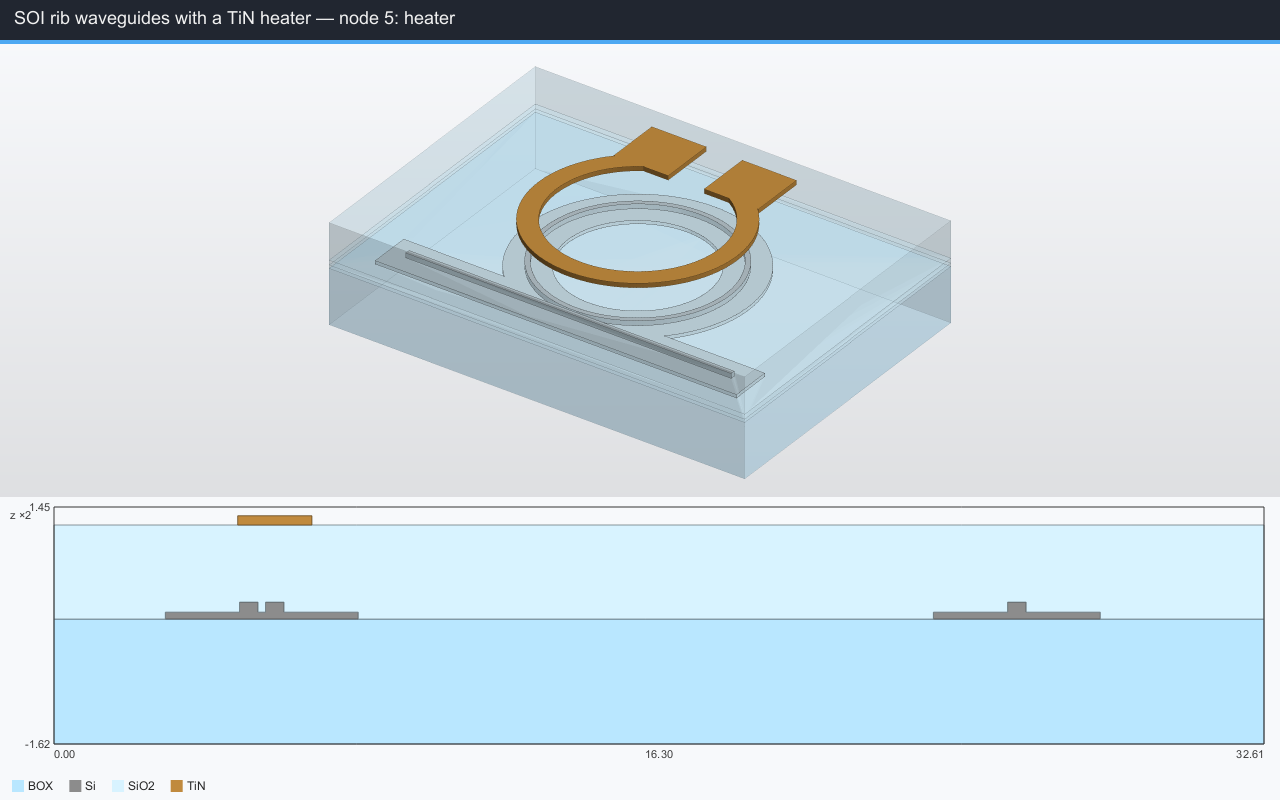
The STEP file holds one named, colored body per material: buried oxide, silicon, oxide cladding and TiN. The rendering shows the 3D model above its cross section along x = 0, which cuts the bus waveguide and the ring where they couple (two rib waveguides on a shared slab, 200 nm apart) and the heater above the ring:
The animation runs through the process one step at a time, with the cross section underneath:
Changing the ring radius, the coupling gap or the slab width in the Laylight source and compiling again gives the new 3D model in under a second; the same source also produces the mask and the netlist. The device is in the repository as samples/lyl/heated_ring.lyl, so it can also be opened in the DSL playground.
Efficient DRC
Why design rule checks struggle with curved layouts, and how Laylight checks them on the semantic geometry inside the compiler, pointing at the line of code, in a fraction of KLayout's time.
Python Dialect
For those who would rather stay in Python than use the DSL, a Python front end that builds Laylight IR directly and compiles it with the same back end.